The development of AI (Artificial Intelligence) technology has made human life easier. We can ask and give commands to anything with the help of AI, from answering math problems, summarizing book or journal material, creating CVs and presentations, and editing photos with the Ghibli animation feature that has become a trend on various social media platforms recently. Using AI assistance simply requires pressing a few buttons and typing a few commands. Some well-known examples of AI features currently in use include Gemini, Canva, Notion AI, and ChatGPT.
The ease and sophistication of AI are like a double-edged sword; they often spark debate. One such debate that went viral involved the use of ChatGPT as a tool for editing Ghibli photos, a trend that appeals to animated photography. On the other hand, it was claimed that ChatGPT could be used as a tool for editing fake bank transfer receipts.
This debate emerged on social media X. The @unmagnetism account on April 6, 2025, uploaded a tweet “it’s really scary on Facebook, someone shared chatgpt can change receipts, the edits are still visible, but for people who are not aware, they can become victims of fraud. Be careful guys.” This tweet received 28 thousand likes, 7.1 thousand reposts, and 563 replies with various comments from netizens.
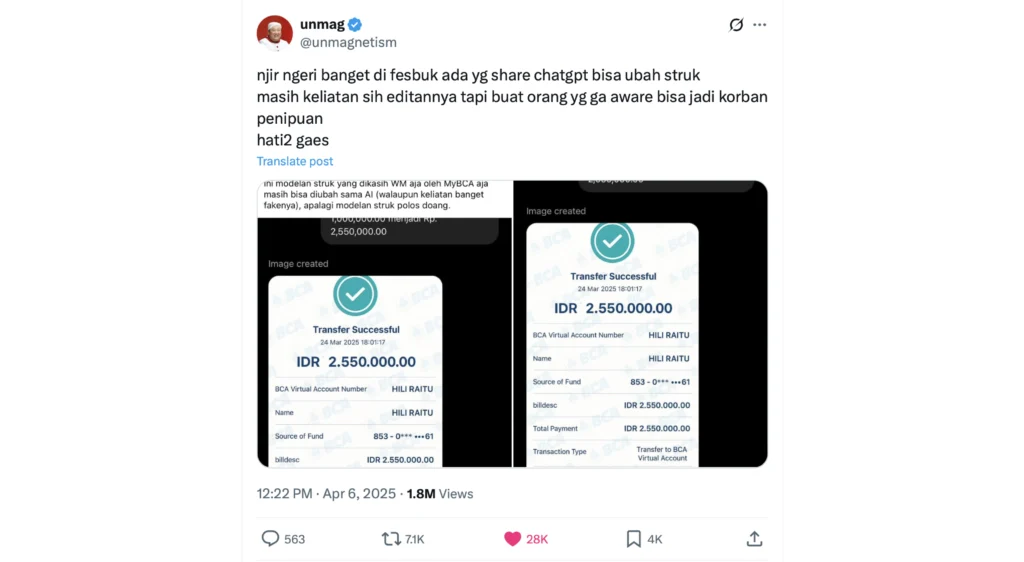
So, is it true that ChatGPT can alter transfer receipt photos, as claimed in the tweet above? To find out the facts, the FactMeter team conducted the following investigative steps:
Step 1: Compare the ChatGPT-generated receipt photo from X with the original BCA mBanking receipt photo
The FactMeter team tried to compare the fake receipt photo edited by ChatGPT from X (left photo) with the original receipt photo (right photo).
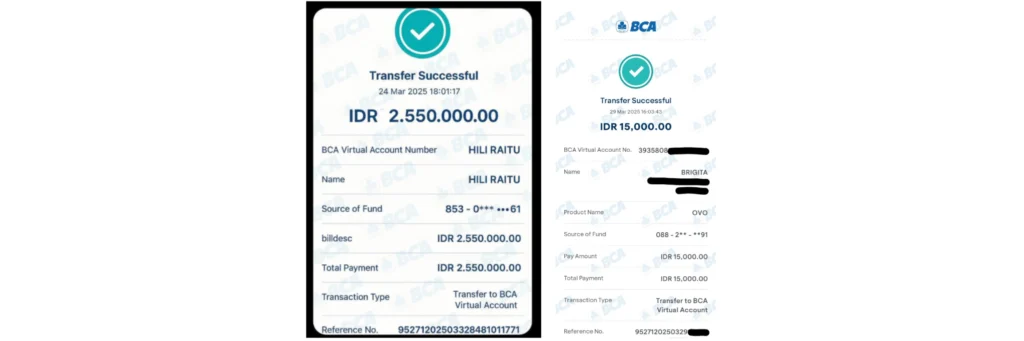
Looking at the two photos, there are several differences between the fake and genuine receipts, including:
- There is a large space between the words “IDR” and the number “2” on the fake receipt. If you look closely, there is a faint scribble between the letter R and the number 2.
- The BCA watermark in the background of the fake receipt appears denser and more numerous than on the genuine receipt.
- The font used in the fake receipt differs from the genuine one.
- On the fake receipt, there is a dividing line between the amount of 2,550,000 and the description “BCA Virtual Account Number.” On the genuine receipt, there is no dividing line between the amount of 15,000 and the description “BCA Virtual Account No.”
- The amount on the fake receipt, 2,550,000.00, is written using a period (.).
- On the genuine receipt, the transfer amount of 15,000 is marked with a comma (,). A period is used to separate the decimal points (00).
- In the fake receipt, the “BCA Virtual Account Number” is written as HILI RAITU, not as the recipient’s VA number. HILI RAITU’s name is mentioned twice, as “BCA Virtual Account Number” and “Name.”
- Meanwhile, on the genuine receipt, “BCA Virtual Account No.” is written as the VA (Virtual Account) number. For VA e-wallet payments, the recipient’s name is written as “Name” or “Nama” in the Indonesian language setting.
- Genuine VA payment receipts display “Product Name” or “Product Type” as the intended payment service provider.
- The fake receipt contains “billdesc” and “Total Payment” indicating the transfer amount. On the genuine receipt, the transfer amount is listed as “Pay Amount” and “Total Amount.”
- On the fake receipt, the “Source of Funds” information, i.e., the sender’s account number, is censored with three asterisks and three circles in the format “853-0*** •••61.” On the genuine receipt, the sender’s account number is censored with two asterisks in the format “088 – 2** – **91.”
Step 2: Using ChatGPT to create a new fake receipt photo
Next, the FactMeter team attempted to edit a photo of a BCA transfer receipt. The team provided the original photo (as shown) and typed in commands to change the recipient’s name and the transfer amount.
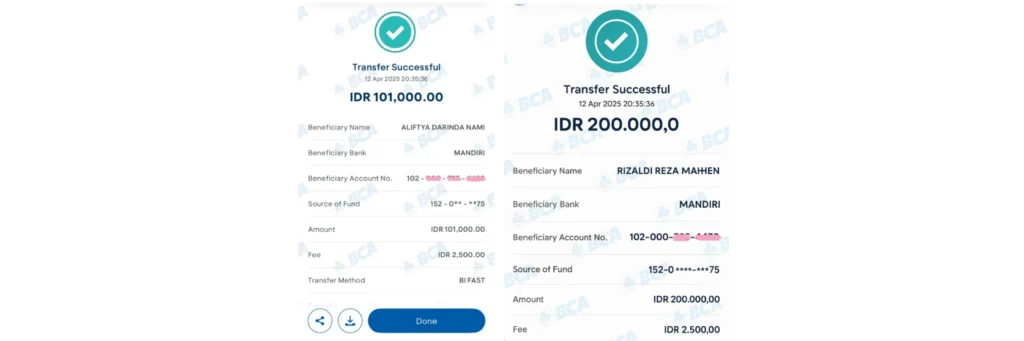
(original photo) (pink line is the account number sensor)
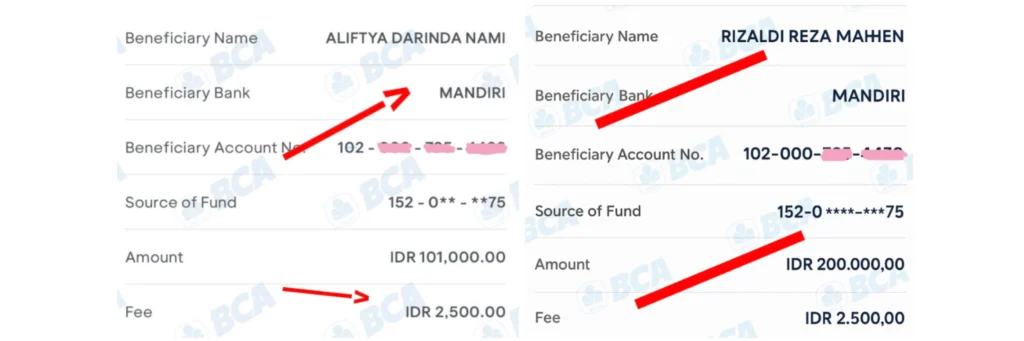
(original photo on the left, edited photo on the right) (pink scribble is the account number sensor)
Unlike the fake receipt photo uploaded to X, the fake receipt photo obtained by the FactMeter team has a similar sequence to the authentic receipt. Some of the differences that can be seen closely are:
- The difference in font thickness and larger letter size.
- The oddity of the letter H in the recipient’s name “Mahen” on the fake receipt.
- The BCA watermark in the photo background has a different slope.
- If you look closely, the “BCA” watermark on the fake receipt appears light blue (greenish), while on the authentic receipt it appears dark blue (navy).
- On the fake receipt, the spacing between each BCA watermark appears parallel. On the authentic receipt, the BCA watermarks do not appear parallel.
- On the fake receipt, the text “Transfer Successful” and “IDR 200,000” is in a darker font. The authentic receipt uses a blue font.

- In the transfer amount information, the counterfeit receipt uses a period around the nominal amount of 200,000 (two hundred thousand). Meanwhile, the genuine receipt uses a comma around 101,000 (one hundred thousand).
- There is a difference in the number of asterisks (censored account numbers) in the “Source of Funds” section. The counterfeit receipt has a total of 4 asterisks and 3 sensor asterisks. The genuine receipt also has 2 sensor asterisks. The dashes (-) are spaced differently, with the counterfeit receipt appearing closer together, while the genuine receipt has a gap between the dashes (-).

From the data obtained, it was concluded that ChatGPT can be used as a tool to edit photos according to specific commands. However, the edited results from ChatGPT will not be perfect and differences can still be observed.
Based on the above case, the FactMeter team urges caution by taking several verification steps to avoid fraud, such as:
- Checking account balances and transactions in mobile banking applications in real time to ensure funds have been credited to the account.
- Using a one-time QRIS barcode, which is valid for only 59 seconds. This is done so that the sender can scan the specified amount with the camera (without having to type the account number). This has been implemented at several outlets, such as payments at McDonald’s and FitHub.
- Paying close attention to the details of transfer receipt photos sent by anyone.
- Do not abuse the sophistication of AI to commit fraud in any form, as “edited” images will still differ from the original version.